

In the NeetoChat Inbox, you can react to messages with emojis and see how far your replies are delivered. Both features are internal, meaning they are visible only to you and your team, not to the customer.
Reacting to a message with an emoji
Open the conversation from your Inbox.
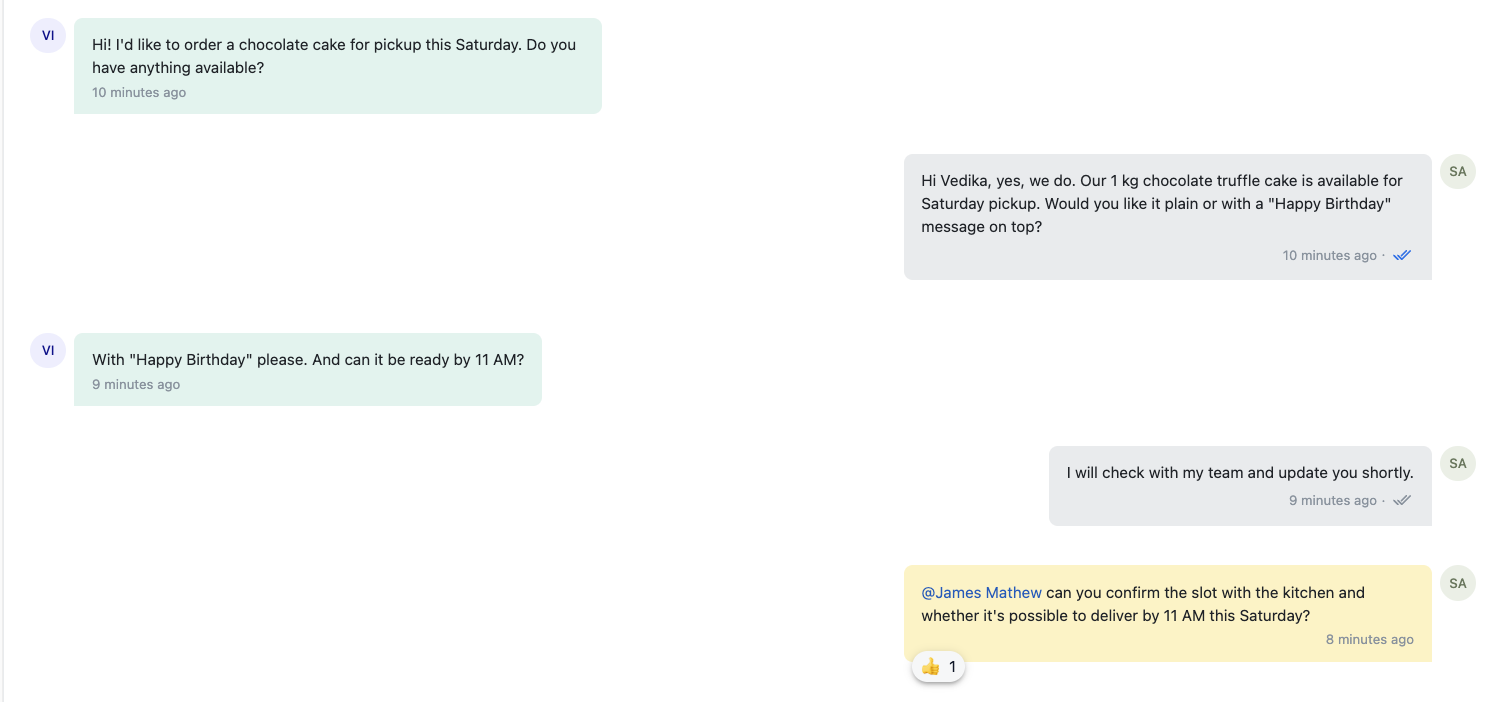
Hover over the message and click the emoji icon.
Pick an emoji from the picker. It appears right below the message.
This is especially helpful when a teammate mentions you in a private note; a quick 👍 acknowledges that you've seen it, without typing a reply.
Tracking status of your messages
Every message you send carries a status, shown next to its timestamp:
Status |
What it means |
Sending |
The message is on its way out. |
Sent |
The message has left NeetoChat. |
Delivered |
The message reached the customer. |
Seen |
The customer has read your message. |
Failed |
The message couldn't be sent, try again. |
Notified via email |
The customer was offline and was notified by email. |
For delivered and seen messages, NeetoChat also shows a double-check icon:
Grey double check (✓✓) Delivered, not yet read by the customer
Blue double check (✓✓) Customer has read your message